210 workflows — and two we deliberately tore down
Automating is the easy part. The hard part is deciding what you don't automate, and which workflow creates more noise than it solves. Our n8n layer orchestrates the operations of our own lab: disk monitoring, pipeline monitors, security scans and backup orchestration.
Trigger → assessment → action → log
Every workflow follows the same shape. There is a cause, there is an explicit threshold that decides whether anything should happen, there is at most one action — and everything lands in the append-only event store.
Which automation you should not build
Two things we got wrong ourselves and then rebuilt: a monitor that matched on an imprecise container name, and a workflow that restarted a healthy container every 30 minutes.
What we built first
- Monitor matches the container name on part of the string
- The actual Compose name differs from the name in the config
- Alert: "container offline" — while the container is simply running
- A separate workflow restarts a healthy container every 30 minutes
- Noise wins: you start ignoring alerts because they are usually nonsense
What is in place now
- Match on the exact Compose name, not a substring
- A manifest with the actual container names as the source
- An alert means something again, because it no longer fires by itself
- Restart on a real health failure, not on a clock
- Every run lands in the event store and can be read back
A workflow isn't finished until you can read it back
Running and building separated
The production instance runs natively under systemd and executes the 210 workflows. Building and trying things out happens on a separate Docker instance, so tinkering with a flow never touches the automation that is running.
Triggers: cron, webhook, event
Some workflows run on a clock, others react to an incoming webhook or to an event from the event store. We choose the trigger per task — not "every five minutes" by default.
Thresholds before actions
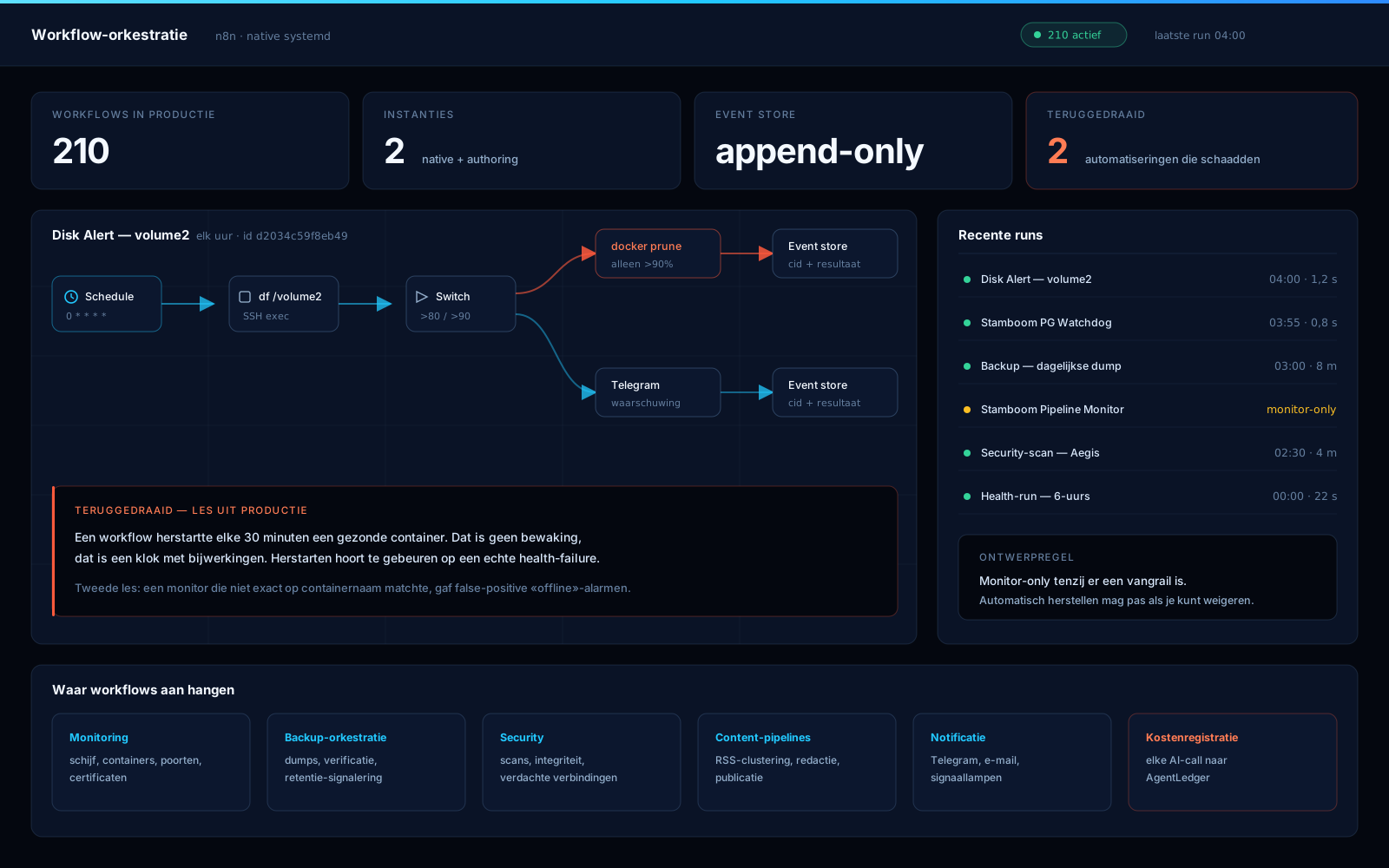
Disk Alert volume2 checks the disk every hour, warns via Telegram from 80% and only prunes Docker above 90%. The action sits behind a threshold, the warning goes to a human first.
Monitoring without intervening
The Stamboom Pipeline Monitor is deliberately monitor-only: it reads out the status and reports, but restarts nothing. The Stamboom PG Watchdog guards the database side of the same pipeline.
Every run readable afterwards
Workflows write to an append-only event store. What a flow saw, when it ran and what it decided stays on record — that is the difference between "something went wrong" and "this is where it went wrong".
Operations as a workflow
Security scans and backup orchestration run as ordinary flows in the same environment. One place where you can see what happens automatically, instead of scripts scattered across a handful of machines.
The chain of a single workflow, drawn out
A clean rendering of the Disk Alert workflow as it runs every hour: trigger, measurement, split on the threshold value, and both branches ending in the same event store. On the right the most recent runs; at the bottom the automation we rolled back.
Want to know which of your processes deserve automation?
We prefer to start by cutting rather than building: which tasks really run on a clock, which belong on an event, and which are better left alone. Only then the flows.